"your evaluation copy has expired" if you cannot activate the bluesoleil, first uninstall the bluesoleil completely. (trial reset)
0) uninstall bluesoleil
1) remove the following keys (BACKUP ANY KEY YOU REMOVE)
HKEY_LOCAL_MACHINE\SOFTWARE\BSPACode
HKEY_LOCAL_MACHINE\SOFTWARE\BSProductManage
HKEY_LOCAL_MACHINE\SOFTWARE\Classes\TypeLib\{E20ED 21D-ADC7-44B0-8371-B625B994BE4E}
HKEY_LOCAL_MACHINE\SOFTWARE\Classes\CLSID\{0E5B57B 7-B7A5-4DCC-84B7-4B2F625547C0}
HKEY_LOCAL_MACHINE\SYSTEM\CurrentControlSet\Servic es\BTHidEnum
HKEY_LOCAL_MACHINE\SYSTEM\CurrentControlSet\Servic es\BTHidMgr
HKEY_LOCAL_MACHINE\SYSTEM\CurrentControlSet\Servic es\btnetBUs
HKEY_LOCAL_MACHINE\SYSTEM\CurrentControlSet\Servic es\BlueletAudio
HKEY_LOCAL_MACHINE\SYSTEM\CurrentControlSet\Servic es\BlueletSCOAudio
HKEY_LOCAL_MACHINE\SYSTEM\CurrentControlSet\Servic es\BT
HKEY_LOCAL_MACHINE\SYSTEM\CurrentControlSet\Servic es\Btcsrusb
HKEY_LOCAL_MACHINE\SYSTEM\CurrentControlSet\Servic es\BtHidBus
HKEY_LOCAL_MACHINE\SYSTEM\CurrentControlSet\Servic es\IvtBtBUs
HKEY_LOCAL_MACHINE\SYSTEM\CurrentControlSet\Servic es\VComm
HKEY_LOCAL_MACHINE\SYSTEM\CurrentControlSet\Servic es\VcommMgr
2) check in
HKEY_LOCAL_MACHINE\SOFTWARE\Microsoft\Windows\Curr entVersion\Reinstall\**NUMBER VARIABLE***
the following pattern
"DeviceDesc"="Bluetooth Device"
"DisplayName"="Bluetooth Device"
"Mfg"="IVT Corporation"
"ProviderName"="IVT Corporation"
and delete the whole main key (you'd better rescale the number of the other keys in case there are subsequent ones)
3) delete in
HKEY_LOCAL_MACHINE\SOFTWARE\Microsoft\Windows\Curr entVersion\Installer\Folders
**ONLY THE KEY*
"C:\\Program Files\\BlueSoleil\\"="" or whatever is your programs path
4) open explorer in c:\windows\system32\drivers and select column Company Name (View->Choose details->flag on Company)
backup and delete from there all files from IVT Corporation
5) backup and delete from c:\windows\system32 the folder ivtMobCache
6) in Control Panel -> Windows Firewall -> Exceptions, delete Bluesoleil entry
You're done.
7) Restart the Computer.
8) Reinstall BlueSoleil and there should be no memory effects of previous installations.
Artificial Intelligence Through Prolog
by Neil C. Rowe
ISBN-10 / ASIN: 0130486795
ISBN-13 / EAN: 9780130486790
Publisher: Prentice Hall
Number Of Pages: 481
Publication Date: 1988-01
Download Ebook!
Visual Prolog is a logical programming language that counts PDC Prolog and Turbo Prolog
as predecessors.
The goal of Visual Prolog is to support industrial strength programming of complex
knowledge emphasized problems.
Today Visual Prolog is a very powerful and safe programming language combining the
very best features of logical, functional and object-oriented programming paradigms
in a consistent and elegant way.
Install-Notes:
==============
install and check crack dir
Download
Is introducing a large number of changes to the way that the
.NET Framework operates. Familiar technologies are being altered, best
practices replaced, and developer methodologies adjusted. Many
developers find it hard to keep up with the pace of change across .NET's
ever-widening array of technologies. You may know what's happening in
C#, but how about the Azure cloud? How is that going to affect your
work? What are the limitations of the new pLINQ syntax? What you need is
a roadmap. A guide to help you see the innovations that matter and to
give you a head start on the opportunities available in the new
framework.Introducing .NET 4.0: with Visual Studio 2010 is designed to
provide you with just that roadmap. It serves as a no-nonsense primer
that will help experienced .NET developers understand the impact of the
new framework and its associated technologies.This book will keep you
updated on the changes and help you to seize new opportunities
confidently and quickly.What you'll learnGet an overview and brief
history of each new or changing technology that puts it into
contextFamiliarize yourself with key concepts and opportunities through
highly accessible tutorialsUnderstand how to perform common tasks in new
technology areas such as pLINQGain expert performance tipsSee examples
of real-world applications of each technology to help you learn how a
technology can be put to workWho is this book for?The book is aimed at
.NET 3.5 developers who will be trying to get to grips with .NET 4.0 and
the associated supporting technologies, such as ASP.NET MVC, pLINQ,
etc., which will be changing the way they need to think about creating
applications.
Download!!

මෙය මා(හිරුෂාන්) විසින් සකස් කරන ලද්දකි..උපුටා ගැනීම ස්ලිටි සිසුන් සදහා පමණි.මෙය නොමිලේ බෙදාහැරීම පිනිස සකස් කරන ලද්දකි..

New Moon DVDRip XviD-NeDiVx
INFO : http://www.imdb.com/title/tt1259571/
Size: 700MB
PLOT:
After Bella recovers from the vampire attack that almost claimed her life, she looks to celebrate her birthday with Edward and his family. However, a minor accident during the festivities results in Bella’s blood being shed, a sight that proves too intense for the Cullens, who decide to leave the town of Forks, Washington for Bella and Edward’s sake. Initially heartbroken, Bella finds a form of comfort in reckless living, as well as an even-closer friendship with Jacob Black. Danger in different forms awaits.
Genre: Drama | Fantasy | Horror | Romance
IMDB rating: 4.6/10 (49,810 votes)
Directed by: Chris Weitz
Starring: Kristen Stewart, Robert Pattinson, Taylor Lautner
Release Name: New.Moon.DVDRip.XviD-NeDiVx
Size: 700MB
Audio Quality: MP3 VBR 153kbps
Video Quality: XviD 23.98fps 640Ч272 572kbps
Download :
http://hotfile.com/dl/31226352/3eac1b8/nedivx-newmoon.part1.rar.html
http://hotfile.com/dl/31226522/d27dec6/nedivx-newmoon.part2.rar.html
http://hotfile.com/dl/31226689/349dd0e/nedivx-newmoon.part3.rar.html
http://hotfile.com/dl/31226774/b2af46c/nedivx-newmoon.part4.rar.html
<
p>Insert Sinhala Unicode Characters into SQL Database
Windows Collation Name:
http://msdn.microsoft.com/en-us/library/ms188046.aspx
Download Sinhala Unicode:
http://www.siyabas.lk/sinhala_how_to_install.html
SQL Code :
http://www.mediafire.com/?gqy5gzw4zdm
p>Insert Sinhala Unicode Characters into SQL Database
Windows Collation Name:
http://msdn.microsoft.com/en-us/library/ms188046.aspx
Download Sinhala Unicode:
http://www.siyabas.lk/sinhala_how_to_install.html
SQL Code :
http://www.mediafire.com/?gqy5gzw4zdm

Info :
Microsoft Office Project 2007 gives you robust project-management tools with the right blend of usability, power and flexibility, so you can manage projects more efficiently and effectively. Microsoft Office Project Professional 2007 includes all the capabilities in Office Project Standard 2007.
Part1
Part2
Password :
carbon-14
1. Execute the below T-SQL query to verify the current SQL Server 2008 Service Pack Information.
SELECT
SERVERPROPERTY('Edition') AS 'Edition',
SERVERPROPERTY('ProductVersion') AS 'ProductVersion',
SERVERPROPERTY('ProductLevel') AS 'ProductLevel',
SERVERPROPERTY('ResourceLastUpdateDateTime') AS 'ResourceLastUpdateDateTime',
SERVERPROPERTY('ResourceVersion') AS 'ResourceVersion'
GO
2. Using Add or Remove Programs, Database Administrators can Uninstall SQL Server 2008 Service Pack 1 (SP1). In Add or Remove Program select the Show Updates check box and then choose Service Pack 1 for SQL Server 2008 which comes under Microsoft SQL Server 2008 and click the Remove button to begin the un-installation process.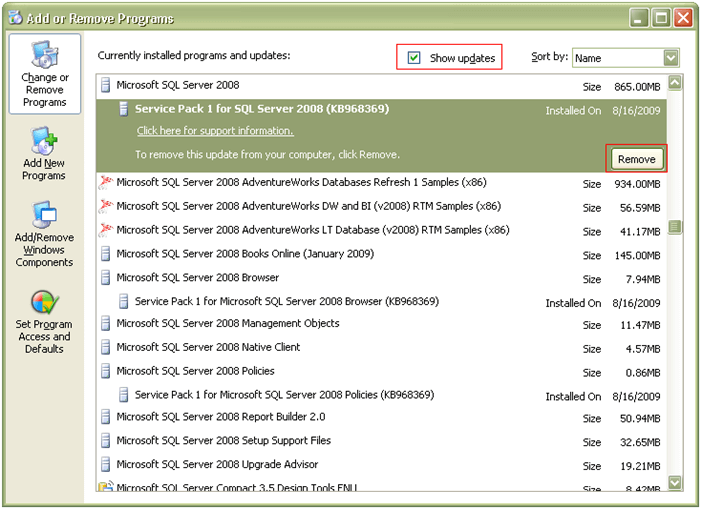
3. This will open up the Uninstall Service Pack 1 for SQL Server 2008 screen as shown in the snippet below. Once all the prerequisite checks are successful, click Next to continue with the un-installation process.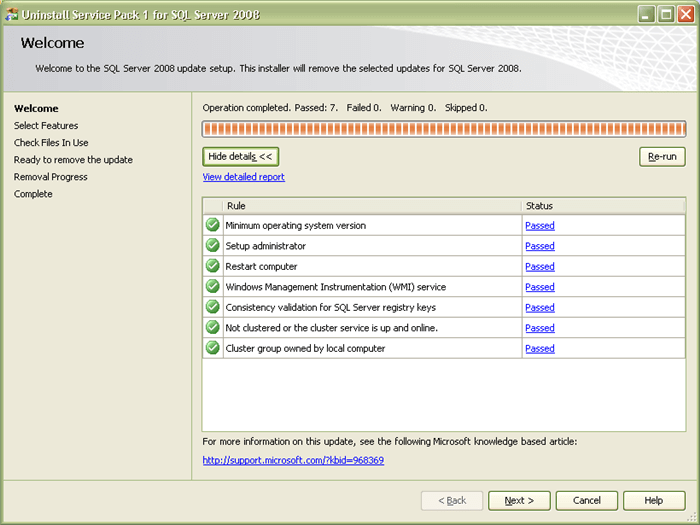
4. In Select Features screen you can choose the feature which you want to remove the update. Click Next to continue with the un-installation process.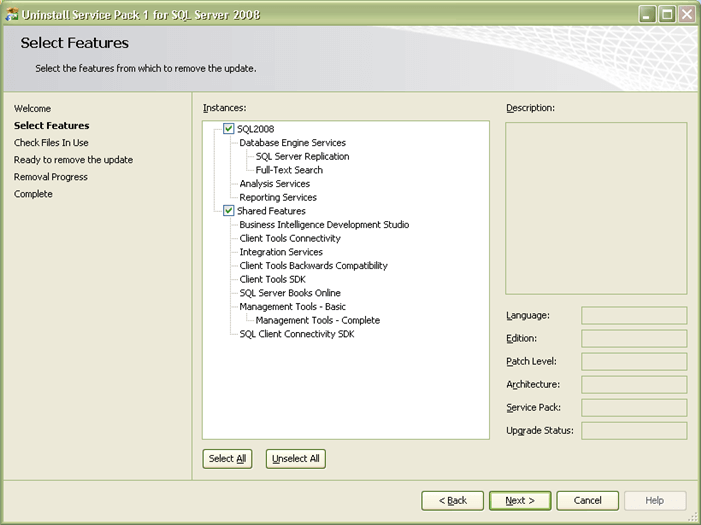
5. In Check Files in Use screen, the un-installation wizard actually checks for services and applications which are currently using files that setup needs in order to complete the un-installation of SQL Server 2008 Service Pack 1. Click Next to continue with the un-installation process.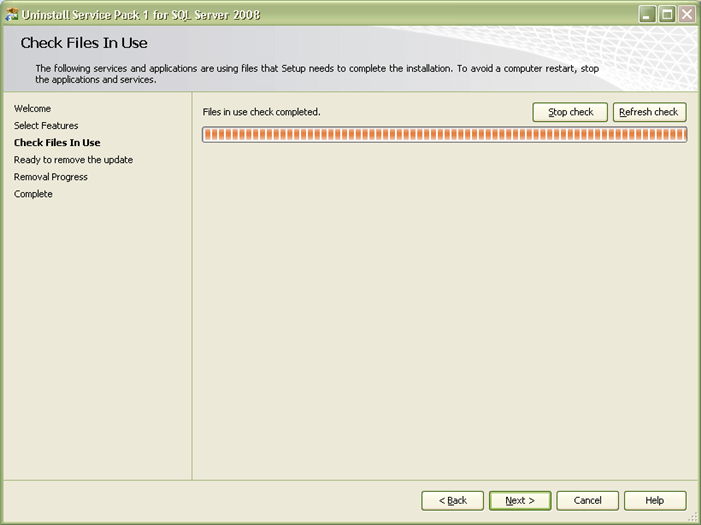
6. In Ready to remove the update screen you can verify the features which you have selected so far to be updated. Click Remove to continue with the un-installation process.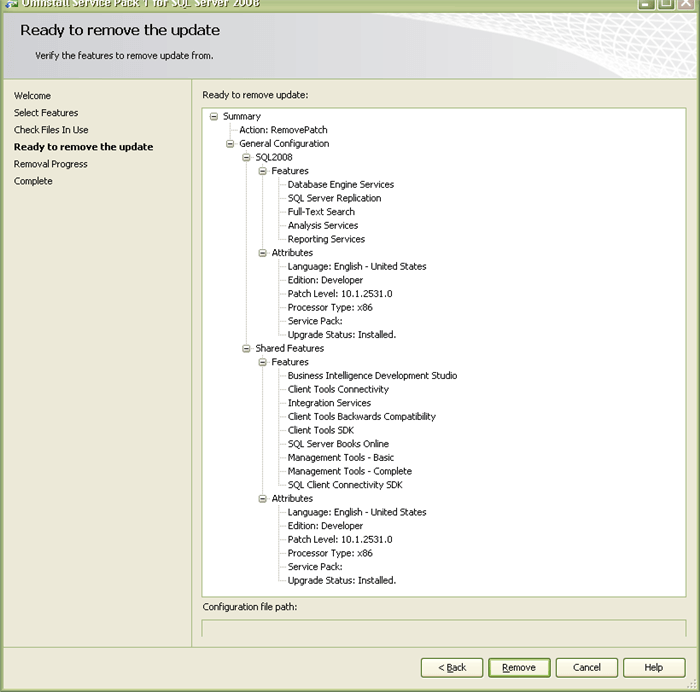
7. In Removal Progress screen you will be able to see Success messages as soon as the un-installation of SQL Server 2008 Service Pack 1 (SP1) has successfully completed. Click Next to complete the un-installation process.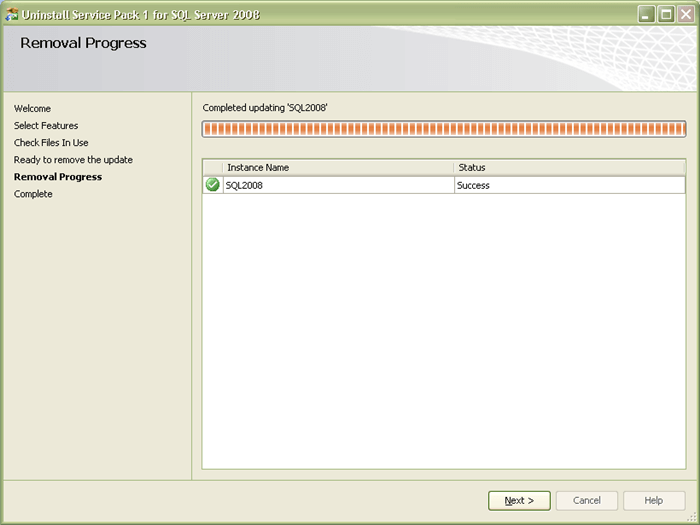
8. In Complete screen you will be able to see the message Your SQL Server 2008 remove update operation has completed successfully. You can also verify the un-installation process activities by going through the summary log. Click Close to end the un-installation process.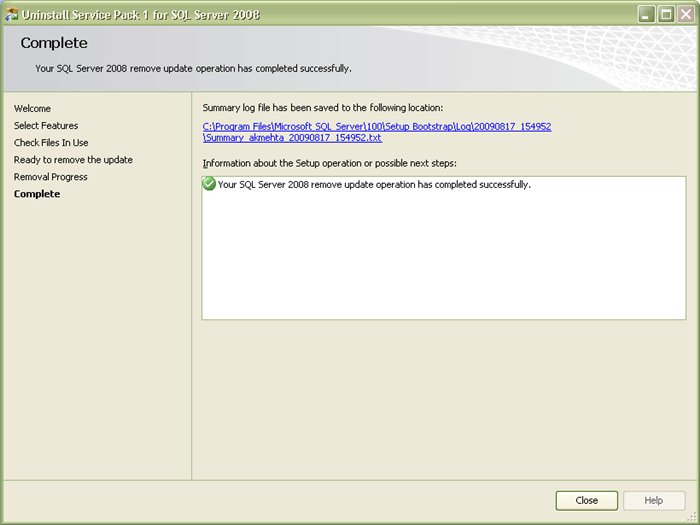
9. You can verify the SQL Server 2008 product version by executing the below mentioned query in SQL Server Management Studio (SSMS)
SELECT
SERVERPROPERTY('Edition') AS 'Edition',
SERVERPROPERTY('ProductVersion') AS 'ProductVersion',
SERVERPROPERTY('ProductLevel') AS 'ProductLevel',
SERVERPROPERTY('ResourceLastUpdateDateTime') AS 'ResourceLastUpdateDateTime',
SERVERPROPERTY('ResourceVersion') AS 'ResourceVersion'
GO